Automatic login on Simatic WinCC Unified RT
Simatic WinCC Unified requires the use of a standard web browser to operate the Runtime SCADA system.
After entering the URL address for the WinCC Unified RT web server, you are presented with the following login dialog:
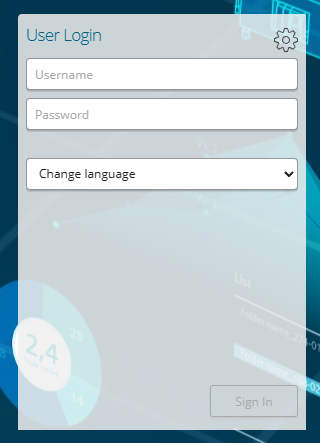
Swappcon ApS has developed an application, which can automate the displayed login dialog using predefined login information.
How the application works
The application is configured using a simple setup program with the following appearance:
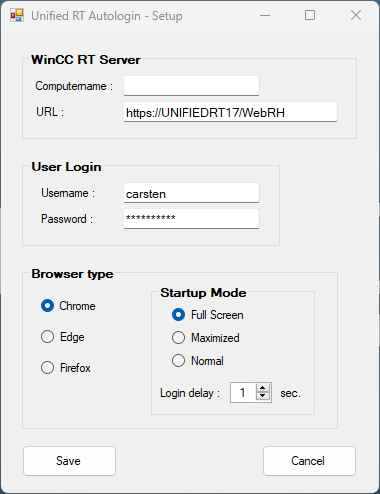
The "Computername" field is specified, which automatically generates the URL to the web server.
The desired username and password are entered, as well as the browser type, start-up mode and possibly login delay to be used.
The application that performs auto login is started from an installed program icon. If automatic auto login is desired when the computer is started, the application can be called from the Windows "Task Scheduler" program, with the highest execution priority.
“The application offers the following options:
- Specifying the WinCC RT Unified computer name and URL
- Specifying a predefined username and password.
- Free choice of startup mode:
- Standard
- Maximized
- Fullscreen
- Specifying the login delay from 1 – 120 seconds.
Software requirements
- The application is installed and run on a standard Windows PC with a web browser installed.
- The following web browsers can be used:
- Gooogle Chrome
- Mozilla Firefox
- Microsoft Edge *
* When using Microsoft Edge, an information banner may appear after startup, which the user must close !
Price
Current sales prices per. 1. november 2023:
- Installation package for 1 standard Windows PC: 215 € excl. VAT
- When purchasing an installation package for several PCs, a special price can be offered.
More info
For further information, please contact Swappcon ApS by email: cgr@swappcon.dk, mobile: +45 29678332.